Docs
Your first campaign, tab by tab.
A campaign is a sequence of steps, the leads it goes to, the inboxes it sends from, and the rules for when. It stays a draft until you press Launch.
Start one
Open Campaigns and press New campaign. Give it a name and it opens on the Sequence tab. Duplicate on the campaigns list copies an existing campaign, with its steps and its inboxes, as a new draft. Templates, on the Sequence tab, saves a sequence under a name, and on a draft that has not sent, Use replaces its steps with a saved one.
Write the steps
Step 1 is the first email. Add steps below it, each with a wait in days, hours or minutes, counted from the step before. A follow-up with an empty subject is sent as a reply in the same thread.
Add an A/B variant to any step. Sends alternate between variants, and the A/B optimization settings can favour the one doing best once enough have gone out.
With a model key set, an Assisted bar under each variant offers Subject ideas, Shorter and Plainer for what you wrote. Nothing changes until you press Use, and your merge fields are kept as they are.
Merge fields
Every CSV column is a field, written in double braces, like {{first_name}} or {{company}}. A fallback covers a blank value: {{first_name|there}}. Wording in single braces varies per send: {Hi|Hello|Hey}.
The bar above the steps lists every field your leads have, plus the sending inbox's signature, name and address. If some leads would get a blank where a field is, the editor names the field and the leads before anything sends.
Copy check
The copy check reads the saved sequence and warns about spam words, more than two links, words in capitals, exclamation marks, a subject over 60 characters, a body over 150 words, images, and no way to opt out. Each email shows its warnings under it, with the flagged words marked, and a line above the steps counts them. It never stops a campaign. When you launch, it says how many warnings are left to look at.
Preview and test
Preview shows each step as a lead you choose will get it, built by the same code that sends. Send test to me sends one step to the address you signed in with, marked [test]. A test counts against the inbox's cap for the day.
Task steps
A step can be a task instead of an email: view a LinkedIn profile, connect on LinkedIn, message on LinkedIn, or call. The text is written out for each lead, ready to paste, and the sequence waits until someone presses Done or Skip on the Tasks page. Nothing is done on LinkedIn for you.
Steps for a reply
Any step after the first can be kept for a reply marked a certain way: If they replied interested, or If they replied not interested. A lead who answers skips the ordinary follow-ups and gets that step once the reply is marked in the unibox.
Leads
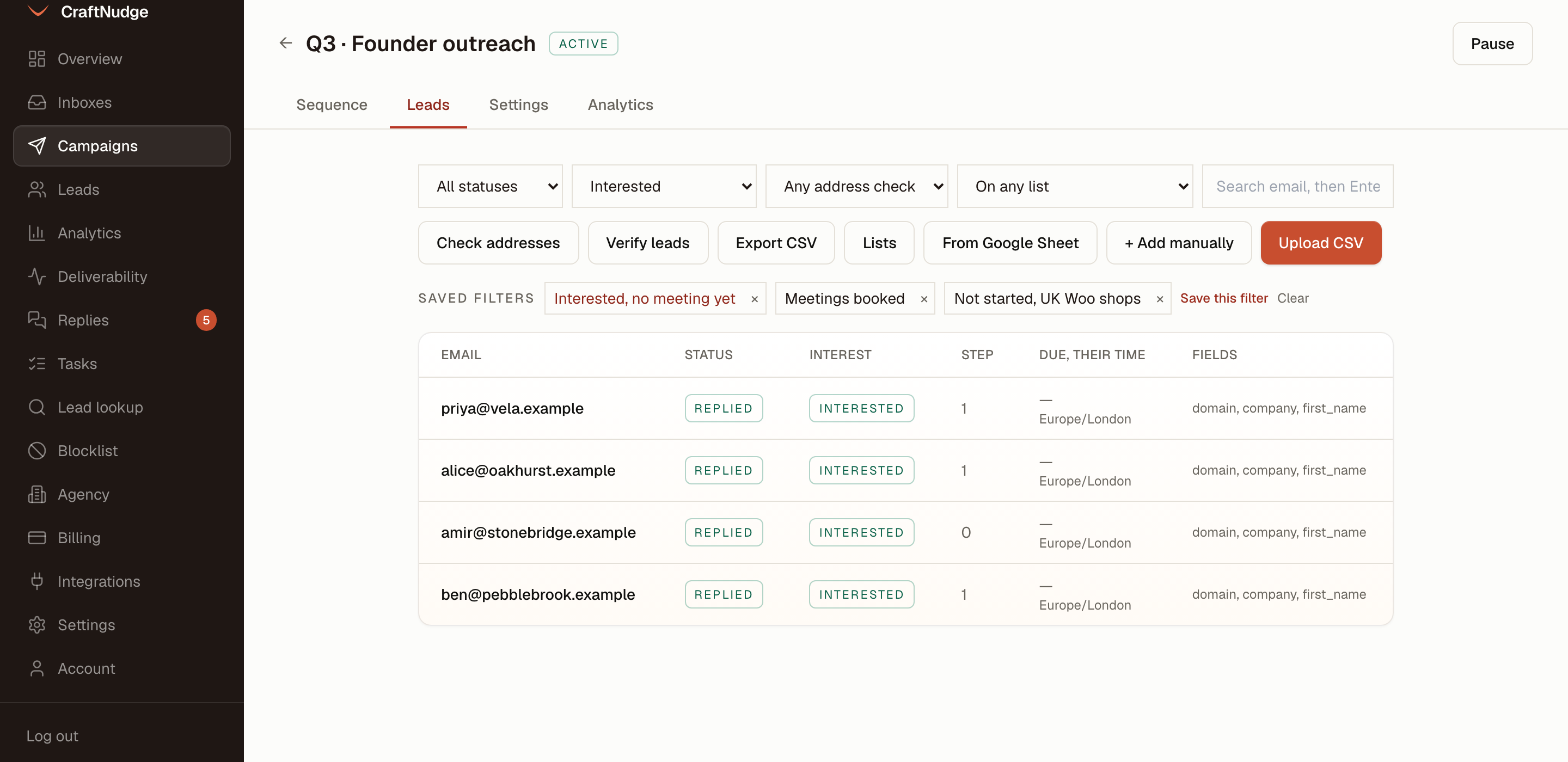
On the Leads tab, Upload CSV takes a file with an email column, and every other column becomes a field. From Google Sheet takes the link of a sheet published to the web as CSV. Add manually takes addresses pasted in. Lists keeps a set of people outside any campaign, so the same set can start more than one.
Every import runs the same five rules and reports what it skipped: the lead import rules. Verify leads checks each lead's domain has a mail server and marks the dead ones invalid. Export CSV downloads the leads with their status.
With a Reoon key saved in Settings, on the Sending rules tab, each lead you import waits for an address check before it can be mailed, and shows valid, invalid, risky or unknown once the answer is back. Check addresses sends the leads imported before the key was saved to be checked, and the line above the table sums up what the checks found.
The filters above the table narrow the leads by status, interest, address check, lead list, or a search on the email. Save this filter keeps what you set under a name. The name then sits under Saved filters on the Leads tab of every campaign in the workspace, where a click puts the filter back and × deletes it for everyone.
Settings
Sending inboxes: the inboxes this campaign sends from. Sends rotate across them.
Schedule: the timezone, the hours, the days, and optional start and stop dates. Weekdays, 09:00 to 17:00 by default.
Add another window gives the campaign up to four sending windows, each with its own hours and days, such as weekdays from 09:00 to 17:00 and Saturday from 10:00 to 12:00. It sends inside any of them. A window cannot run past midnight or overlap another on the same day, so a late night is two windows.
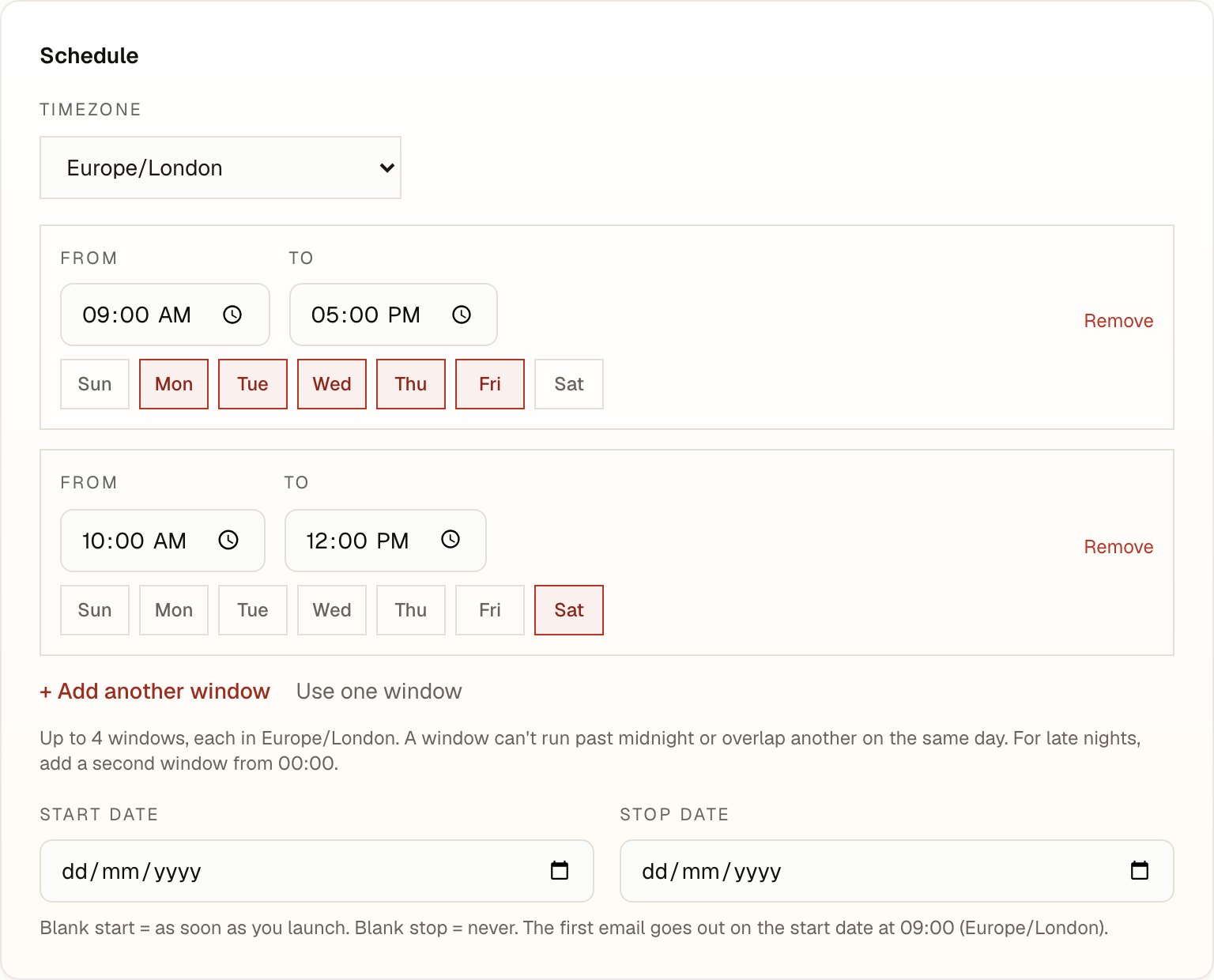
Send in each lead's timezone reads those days and hours on the lead's own clock. The lead's timezone comes from a timezone column in the import, or else a country column for a country with one clock. A lead with neither keeps the campaign's timezone, and so does a lead in a country with several, such as the US, unless a timezone column names the zone. The daily limit and the start and stop dates stay on the campaign's own clock, and the Leads tab shows when each lead is next due, on their time.
Limits: a daily limit for the campaign, 30 by default, a cap on new leads a day, whether new leads go before follow-ups, whether leads whose address check comes back invalid or risky are skipped (on), and a deal value, which the pipeline under Analytics adds up for each lead who replies with interest.
Deliverability and replies: stop sending on reply (on), stop the whole company on reply, stop on auto-reply, open and click tracking (both off), the one-click unsubscribe header (on), and sending as plain text.
A/B optimization, and CC, BCC and tags.
Launch
Press Launch. It needs at least one step, an inbox, and the unsubscribe header on. From then on, emails go out inside the campaign's windows, spaced by each inbox's gap, within each inbox's cap and each domain's number for the day. Pause stops new sends at any point, and Launch carries on where it stopped.